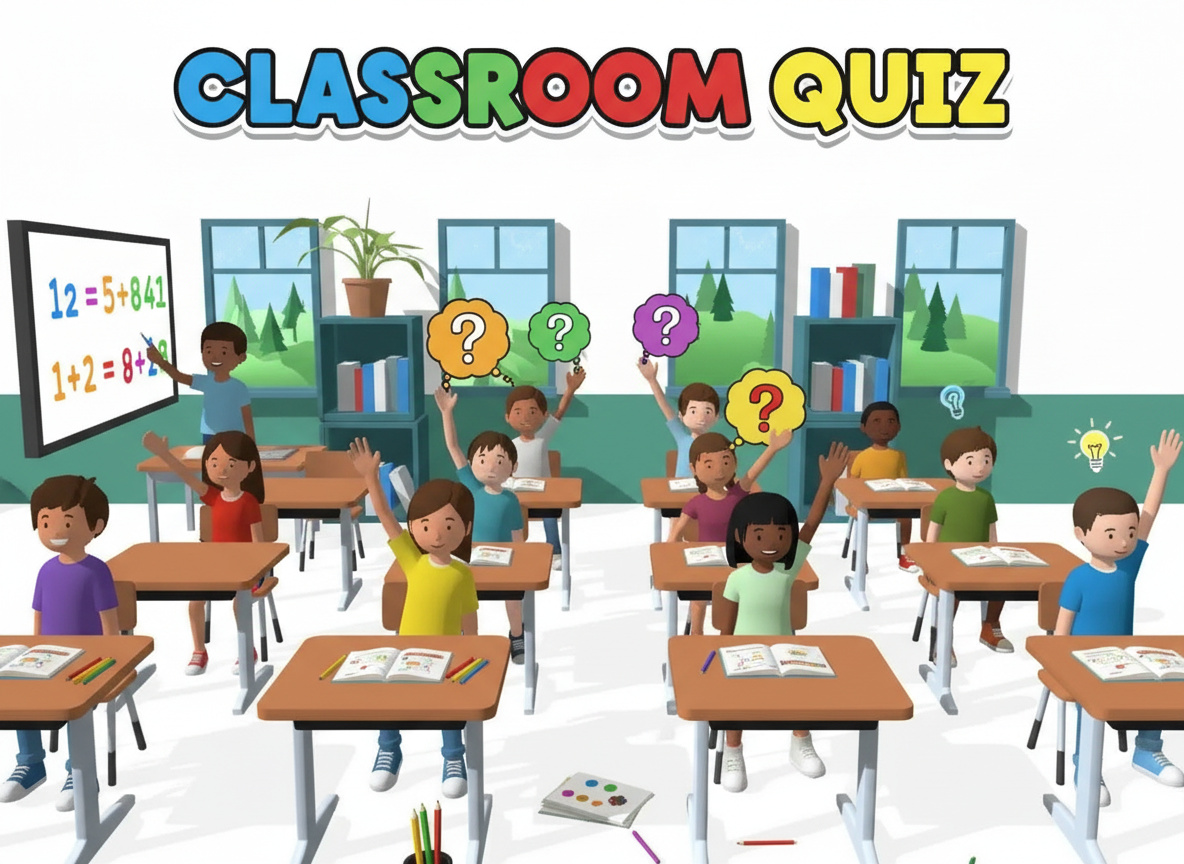
Teacher Simulator
Teacher Simulator
About this game
Step into the dynamic world of education with the immersive GamesOn4Kids.com game, Teacher Simulator. This captivating simulation game places you directly in the shoes of a classroom educator, giving you complete control over your very own virtual school environment. Designed for aspiring teachers, curious students, and anyone who enjoys strategic management challenges, this free-to-play title lets you experience the daily triumphs and tribulations of teaching. From grading assignments to managing energetic students, the Teacher Simulator offers a unique perspective on life from the other side of the desk, available instantly in your browser.
What is Teacher Simulator? – Complete Game Overview
Teacher Simulator is a highly engaging and educational simulation game where players assume the demanding yet rewarding role of a school teacher. This title moves beyond simple rote tasks, challenging you to manage a diverse classroom, plan engaging lessons, and cultivate a positive learning atmosphere. It’s a fantastic opportunity to explore the complexities of a professional teaching career without the real-world pressure, making it perfect for kids interested in what their teachers do all day.
The core gameplay loop of Teacher Simulator revolves around daily classroom management. You’ll interact with individual students, address their needs, and encourage their academic growth. This simulation offers a detailed look into the responsibilities of an educator, emphasizing organizational skills and quick decision-making. As you progress, you’ll unlock new challenges and responsibilities, keeping the experience fresh and continuously stimulating for all players on GamesOn4Kids.com.
How to Play Teacher Simulator – Step-by-Step Guide
Getting Started with Teacher Simulator
Embarking on your teaching journey in Teacher Simulator is straightforward and intuitive. Upon launching the game on GamesOn4Kids.com, you’ll be guided through a brief tutorial that familiarizes you with the basic interface and objectives. Your first task will often involve setting up your virtual classroom, selecting your teaching persona, and getting ready for your first batch of students. This initial phase helps new players understand the core mechanics and prepares them for the exciting challenges ahead in this engaging simulation game genre.
Once your classroom is prepared, students will begin to arrive, each with their own personalities, learning styles, and behavioral quirks. Pay close attention to the on-screen prompts and objectives, which will direct your first actions, such as taking attendance or distributing initial assignments. Understanding these fundamental steps is crucial for building a strong foundation in Teacher Simulator and ensuring a smooth start to your career as a virtual educator. Remember, every decision you make impacts your students’ learning environment.
Basic Controls and Gameplay
Playing Teacher Simulator is designed for ease and accessibility, primarily utilizing your computer’s keyboard and mouse. The mouse is your primary tool for navigating the classroom, clicking on students, interacting with objects like the blackboard or grading papers, and selecting menu options. Keyboard controls often supplement this, allowing for quick actions such as opening your lesson plan book or accessing student records. Mastering these simple inputs will enable you to efficiently manage your classroom.
The game unfolds in a series of school days, each presenting different tasks and challenges. You’ll need to grade exams accurately, deliver lessons by interacting with various classroom tools, and maintain order by addressing disruptive behavior promptly and fairly. Success in Teacher Simulator depends on balancing these various responsibilities. Keep an eye on student mood and performance indicators to gauge your effectiveness and adjust your teaching strategies as needed. It’s a continuous learning curve for both you and your virtual students.
Advanced Teacher Simulator Techniques
To truly excel in Teacher Simulator, players must move beyond basic classroom management and adopt more sophisticated strategies. Effective time management is paramount; prioritize tasks like grading urgent assignments while also dedicating time to individual student support. Learn to recognize patterns in student behavior and academic progress, allowing you to proactively address potential issues before they escalate. A well-organized teacher is a successful teacher in this game.
Furthermore, experimenting with different teaching methods can yield better results. Some students might respond well to visual aids, while others need more one-on-one attention. Adapting your approach to suit diverse learning styles is a hallmark of an expert Teacher Simulator player. Don’t be afraid to try new things, observe the outcomes, and refine your techniques. This strategic depth ensures that the game remains engaging and challenging even for seasoned players. The goal is always to foster a productive and happy learning environment.
Teacher Simulator Game Features and Highlights
The Teacher Simulator game is packed with features designed to provide a rich and authentic teaching experience. From interactive classroom elements to complex student dynamics, every aspect is crafted to immerse you in the role. The game emphasizes both the academic and behavioral aspects of teaching, offering a holistic view of the profession. These highlights make the Teacher Simulator an exceptionally engaging and replayable title on GamesOn4Kids.com for children and even older players.
- Interactive Classroom Environment: Engage with various objects and tools within your classroom, including whiteboards, textbooks, and grading sheets. Each element plays a role in your daily teaching duties, making the virtual classroom feel alive and responsive to your actions.
- Student Behavior Management: Deal with a range of student personalities, from diligent learners to mischievous pranksters. Your ability to manage disruptive behavior and motivate students directly impacts your classroom’s success and overall atmosphere.
- Lesson Planning and Delivery: Create and execute lesson plans covering diverse subjects. The game challenges you to present information effectively and ensure students grasp the material, mimicking real-world teaching demands.
- Grading and Assessment System: Evaluate student performance by grading assignments and exams. Provide feedback that helps students improve, and manage the administrative tasks associated with academic record-keeping in Teacher Simulator.
- Progressive Career Path: As you successfully navigate your teaching career, you’ll unlock new classrooms, grade levels, and responsibilities. This progression adds long-term goals and keeps the gameplay exciting as you strive to become the ultimate virtual educator.
Beyond these core mechanics, Teacher Simulator includes subtle yet impactful features like dynamic student mood meters and evolving academic challenges. These elements respond to your actions, creating a vibrant and ever-changing classroom landscape. The game encourages problem-solving and adaptive thinking, as no two school days are ever exactly alike. This intricate design ensures that every session of Teacher Simulator offers new opportunities for learning and enjoyment, pushing you to refine your teaching prowess.
Why Kids Love Playing Teacher Simulator
Kids are naturally curious about the adult world, and Teacher Simulator provides a safe, interactive space for them to explore the role of an educator. They get to be in charge, a perspective often limited in their daily lives, which is incredibly empowering. This role-reversal fosters empathy and helps children understand the challenges and responsibilities their own teachers face. It’s a playful yet profound way to gain appreciation for the hard work involved in teaching and managing a classroom.
The appeal of Teacher Simulator also stems from its blend of creativity and strategy. Children love designing their lessons, choosing how to respond to different student scenarios, and seeing the direct impact of their decisions. It taps into their natural desire to nurture and guide, while also offering engaging puzzles and management tasks. The game becomes a personal narrative where they can shape their ideal classroom, fostering a sense of accomplishment and ownership over their virtual educational space.
Beyond entertainment, Teacher Simulator offers significant educational value, proving that educational gaming can be both fun and informative. It subtly teaches organizational skills, decision-making under pressure, and the importance of patience and fairness. Children learn about responsibility through grading papers and managing deadlines, and they develop problem-solving abilities when dealing with tricky student behaviors. This game isn’t just about fun; it’s a valuable tool for developing crucial life skills in an engaging context.
Pro Tips and Strategies for Teacher Simulator
Beginner Tips
For newcomers to Teacher Simulator, the key is to focus on the fundamentals. Start by mastering basic classroom organization: ensure all students have their materials, take attendance diligently, and follow the daily schedule closely. Don’t try to tackle every single student issue simultaneously; prioritize the most disruptive behaviors first to maintain overall classroom harmony. Consistency in your approach will lay a strong foundation for future success in this challenging simulation.
Another excellent tip for beginners is to pay attention to the in-game tutorial messages and objectives. They are designed to guide you through the initial stages and introduce you to essential mechanics. Don’t rush through lessons; take your time to deliver clear instructions and engage with students individually when prompted. Building a positive rapport with your virtual class early on in Teacher Simulator can prevent many future headaches and make your teaching experience much more enjoyable.
Intermediate Strategies
As you gain experience in Teacher Simulator, you’ll want to implement more advanced strategies to optimize your classroom. Begin by developing a robust lesson planning routine that incorporates various teaching methods. Mix group activities with individual assignments to cater to different learning styles. Proactive classroom management becomes crucial; instead of just reacting to misbehavior, anticipate potential issues and implement preventative measures, such as engaging all students through interactive tasks.
Effective resource management is another intermediate strategy. Utilize all available classroom tools, from educational posters to interactive whiteboards, to enhance your lessons. Learn to delegate tasks where appropriate and manage your energy levels – a stressed teacher is less effective. Furthermore, start experimenting with different grading rubrics and feedback styles to see which ones yield the best academic improvements in your students within the Teacher Simulator environment. Continuous refinement is key.
Expert Teacher Simulator Secrets
To truly become a master educator in Teacher Simulator, you need to think like a long-term strategist. This involves understanding the complex interplay between student morale, academic performance, and your teaching style. Develop personalized learning paths for your most challenging or gifted students. Implement reward systems for good behavior and academic achievement, fostering a positive competitive spirit among your class. An expert teacher not only reacts but also innovates consistently.
Dive deep into the game’s mechanics to uncover hidden interactions and opportunities. Sometimes, a seemingly minor action can have significant ripple effects on your classroom environment. Experiment with controversial teaching methods or challenging disciplinary actions to understand their full consequences. Mastering Teacher Simulator means not just completing objectives, but creating an exceptionally well-managed, high-achieving, and happy virtual classroom that truly prepares your students for success. It’s about achieving holistic excellence.
Teacher Simulator vs Other Similar Games
While the market offers various simulation games, Teacher Simulator carves out its niche by focusing specifically on the nuanced role of an educator. Unlike broader management sims that might cover entire schools or cities, this game zeroes in on the intimate dynamics of a single classroom. This specialized focus allows for greater depth in student interactions, lesson planning, and behavior management. It’s less about building an empire and more about cultivating young minds, offering a distinctly different challenge compared to games like Dash Rush which focus on speed and reflexes.
Many other educational games tend to focus on specific academic subjects or simple puzzle-solving. Teacher Simulator, however, transcends this by making the act of teaching itself the core gameplay. It integrates educational principles into its mechanics rather than just delivering content. This makes it a unique blend of strategic management and empathetic role-playing, distinguishing it from casual titles such as Oil Tanker Truck Drive or even whimsical options like LOL Football Funny Face, which are more about quick fun than deep engagement. For those looking for a thoughtful and engaging management experience in the Casual games category, Teacher Simulator stands out prominently.
Technical Requirements for Teacher Simulator
Playing Teacher Simulator is incredibly convenient as it requires no downloads or installations. The game runs directly in your web browser, making it accessible from almost any computer with an internet connection. It is designed for desktop play and performs best on computers using a traditional keyboard and mouse setup, which provides the precise control needed for managing classroom activities and interacting with various in-game elements. This ensures a smooth and enjoyable experience without system compatibility worries.
The game is optimized for modern web browsers such as Chrome, Firefox, Edge, and Safari, ensuring broad compatibility across different operating systems like Windows, macOS, and Linux. For the most immersive experience, Teacher Simulator supports full-screen mode, allowing you to dedicate your entire display to the virtual classroom. This feature helps eliminate distractions and pulls you deeper into the world of teaching. A stable internet connection is recommended to ensure seamless loading and uninterrupted gameplay sessions on GamesOn4Kids.com.
Frequently Asked Questions About Teacher Simulator
Is Teacher Simulator Free to Play?
Yes! Teacher Simulator is completely free to play on GamesOn4Kids.com. You don’t need to purchase anything, download any files, or even register for an account to start your teaching adventure. Simply visit our website, find the game, and begin playing instantly in your browser. Our goal is to provide accessible, high-quality entertainment and learning experiences for kids without any hidden costs or subscriptions. Enjoy countless hours of classroom fun without spending a dime on Teacher Simulator!
Can I Play Teacher Simulator on Mobile?
Teacher Simulator is primarily designed and optimized for desktop computers, offering the best experience with a keyboard and mouse. While modern mobile browsers might load the game, the intricate controls and detailed interface of Teacher Simulator are not ideally suited for touchscreens or smaller mobile device displays. For the most engaging and frustration-free gameplay, we strongly recommend playing Teacher Simulator on a laptop or desktop computer. This ensures you can efficiently manage your classroom and interact with all game elements as intended, providing the full immersive experience.
Is Teacher Simulator Safe for Kids?
Absolutely! Teacher Simulator is developed with children in mind and is completely safe for kids to play. It contains no inappropriate content, violence, or mature themes. The game focuses on positive educational values, problem-solving, and responsible decision-making in a school environment. Furthermore, as an online browser game on GamesOn4Kids.com, it doesn’t require any personal information for play and is free from intrusive advertisements, providing a secure and child-friendly gaming experience. Parents can rest assured that Teacher Simulator offers wholesome and constructive entertainment.
Start Playing Teacher Simulator Now!
Ready to take charge of your own classroom and inspire a generation of virtual students? There’s no better time to dive into the engaging world of Teacher Simulator! Experience the joys and challenges of teaching firsthand, develop crucial management skills, and enjoy hours of educational fun. Head over to GamesOn4Kids.com right now, click on the Teacher Simulator game, and begin your exciting journey as a top-tier educator. It’s completely free, instantly accessible, and promises an unforgettable experience. Don’t just learn about teaching – become the teacher!
How to play
Use your mouse or touch to interact with the game. Follow the in-game instructions to play!







Loading comments...