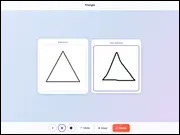
Copy the Drawing
Copy the Drawing
About this game
Welcome to the captivating world of GamesOn4Kids.com, where creativity meets challenge in the exciting art puzzle, Copy the Drawing. This precision-based game invites young artists and puzzle enthusiasts to recreate images with meticulous accuracy, transforming a blank canvas into a masterpiece. Players will immerse themselves in the joy of artistic expression, carefully following outlines and selecting the perfect brush sizes to match the original design. The ultimate goal in Copy the Drawing is to achieve high accuracy, which not only hones fine motor skills and observational abilities but also earns rewarding medals and recognition for exceptional artistry. Get ready to embark on an artistic adventure that blends fun with skill-building, all available for free right here on GamesOn4Kids.com.
What is Copy the Drawing? – Complete Game Overview
Copy the Drawing is an engaging online art puzzle designed to test players’ precision, patience, and artistic eye. The game presents you with a target image, and your task is to replicate it as faithfully as possible using a variety of digital tools. It’s more than just a coloring game; it’s about understanding shapes, lines, and proportions, and then meticulously translating that understanding onto your own drawing canvas. Each level offers a new image to conquer, ranging in complexity to provide a continuously stimulating experience for players of all skill levels.
The core mechanic of the Copy the Drawing game revolves around accuracy. Players must carefully select brush sizes, apply colors within the designated areas, and ensure their lines perfectly match the original. The game provides immediate feedback on your precision, encouraging you to refine your technique with every stroke. This interactive learning process helps develop critical visual analysis skills, making it a valuable and entertaining educational tool. Dive into the world of digital artistry and see how accurately you can replicate each vibrant design in this captivating puzzle.
Beyond simple replication, Copy the Drawing also encourages a degree of personal style. While the goal is accuracy, players can experiment with different techniques and approaches to achieve that precision. Whether you prefer broad strokes or fine details, the game provides the flexibility to adapt your method. This blend of structured challenge and creative freedom ensures that each session is unique and rewarding. It’s a perfect way for kids to explore their artistic talents while sharpening their cognitive abilities, all within a fun, browser-based environment.
The game’s interface is designed to be intuitive and kid-friendly, making it easy for even younger players to pick up and enjoy. From selecting colors to adjusting brush sizes, every tool is readily accessible, allowing players to focus on their artistic task. The satisfaction of earning a top medal for a highly accurate drawing is a major motivator, driving players to improve their skills and tackle more complex images. Discover the joy of precise art replication and endless fun with the Copy the Drawing game, enhancing both creativity and attention to detail.
How to Play Copy the Drawing – Step-by-Step Guide
Getting Started with Copy the Drawing
To begin your artistic journey in Copy the Drawing, simply navigate to the game page on GamesOn4Kids.com. The game loads directly in your browser, requiring no downloads or installations, so you can jump straight into the action. Once loaded, you’ll be presented with your first challenge: an original drawing displayed prominently on screen. Your blank canvas will be ready for you to begin replicating the image. Take a moment to observe the target drawing, noting its primary shapes, colors, and the thickness of its lines before you make your first move. This initial observation is key to a successful replication in the Copy the Drawing game.
Basic Controls and Gameplay
Playing Copy the Drawing is straightforward and intuitive. You’ll use your mouse or touchpad to select different brush sizes and colors from the palette provided. Click on a brush size to choose it, then click on a color to load your brush. To draw, simply click and drag your cursor across the canvas, mimicking the lines and shapes of the original image. The game typically features an “undo” button, allowing you to correct mistakes and refine your work without starting over. Focus on carefully tracing outlines and filling in areas with the correct colors to achieve maximum accuracy. Remember, precision is your best friend when you play Copy the Drawing.
Advanced Copy the Drawing Techniques
For players looking to excel in Copy the Drawing, mastering advanced techniques is essential. Start by focusing on the overall composition before diving into details. Use larger brushes for broad strokes and filling in large areas, then switch to smaller brushes for intricate details and fine lines. Pay close attention to the shades and nuances of color, trying to match them as closely as possible. Don’t be afraid to use the undo feature strategically to perfect challenging sections. Observing the target image in segments can help break down complex drawings into manageable parts, improving your overall accuracy and helping you earn those coveted top medals in the Copy the Drawing game.
Copy the Drawing Game Features and Highlights
Copy the Drawing stands out with a collection of features designed to enhance the artistic experience and provide engaging challenges for kids. Its focus on precision, combined with user-friendly tools, makes it a uniquely satisfying game. These highlights contribute to its widespread appeal and ensure endless hours of creative fun.
- Precision-Based Gameplay: The core mechanic encourages meticulous attention to detail, rewarding players for accurate reproductions.
- Variable Brush Sizes: Players can choose from multiple brush thicknesses, allowing for both broad strokes and fine detailing.
- Diverse Image Library: A wide range of drawings ensures fresh challenges and continuous engagement, from simple shapes to complex scenes.
- Instant Browser Play: No downloads or installations needed; simply open your browser and start playing the Copy the Drawing game.
- Mobile and Desktop Compatibility: Enjoy the game seamlessly on any device, providing flexibility for playtime anywhere.
Expanding on these features, the variable brush sizes are a critical component, offering players the flexibility to tackle any part of a drawing effectively. Whether it’s laying down a base color or adding a tiny sparkle, the right brush is always at your fingertips. The diverse image library ensures that boredom is never an option, with new and exciting pictures constantly appearing. This variety keeps the game fresh and encourages players to expand their artistic repertoire. The immediate browser play feature means less waiting and more drawing, making it a perfect pick-up-and-play title for quick creative breaks. Furthermore, the game’s compatibility across both mobile and desktop devices ensures that you can always enjoy the challenge of Copy the Drawing, whether at home or on the go. This accessibility is a major plus for modern gaming, making it easy for kids to engage with their favorite art puzzle whenever they like.
The feedback system, which awards medals based on accuracy, serves as a powerful motivator. Players aren’t just drawing; they’re striving for excellence, which adds a competitive edge to the creative process. Earning a gold medal for a perfectly replicated drawing provides a real sense of accomplishment, encouraging continued practice and improvement. This reward system reinforces positive learning behaviors, making the act of drawing both fun and goal-oriented. Full-screen mode also offers an immersive experience, allowing players to fully focus on their artwork without distractions. These thoughtful features make Copy the Drawing an exceptional and enriching online game for aspiring artists and puzzle lovers.
Why Kids Love Playing Copy the Drawing
Kids are naturally drawn to Copy the Drawing because it perfectly blends the joy of artistic creation with the satisfying challenge of a puzzle. The game taps into their innate desire to create and express themselves, while also providing a structured environment where they can hone specific skills. There’s an immediate sense of accomplishment when they successfully replicate an image, especially when they earn a high accuracy medal. This positive reinforcement encourages them to keep playing, improving their techniques with each new drawing. The game’s simple yet engaging premise ensures that it remains accessible and fun for a wide age range of children, fostering a love for art in a digital format.
Moreover, Copy the Drawing offers significant educational benefits disguised as entertainment. It’s an excellent tool for developing fine motor skills, as the precise movements required for drawing help strengthen hand-eye coordination. Children also enhance their observational skills by carefully analyzing the original image, noting details, proportions, and color variations. This game promotes patience and focus, as rushing often leads to lower accuracy scores, teaching kids the value of careful work. For these reasons, parents appreciate the constructive play, making Copy the Drawing a favorite choice for screen time. It provides a creative outlet that also builds essential cognitive and motor skills, all while having fun.
The variety of images available ensures that the game remains fresh and exciting. Kids never quite know what they’ll be asked to draw next, from animals and objects to more abstract designs, keeping their interest piqued. This diversity also exposes them to different artistic styles and complexities, expanding their visual literacy. The ability to play Copy the Drawing online without any downloads means instant access to this creative playground, eliminating barriers to entry. It’s a low-pressure environment where mistakes can be undone, encouraging experimentation and learning from errors without frustration. This blend of creativity, challenge, and accessibility makes the Copy the Drawing game a truly beloved experience for children.
The element of personal achievement is also a huge draw. Earning a gold medal in Copy the Drawing feels like a real victory, a testament to their growing artistic skill. This goal-oriented play motivates children to practice and refine their approach, fostering a growth mindset. They learn that with persistence and careful attention, they can achieve impressive results. The game acts as a digital art studio where they can freely express themselves within a structured challenge. It’s a wonderful way to boost confidence in their artistic abilities and inspire further exploration of drawing and painting, making the Copy the Drawing experience both enriching and incredibly enjoyable for all young players.
Pro Tips and Strategies for Copy the Drawing
Beginner Tips
For newcomers to Copy the Drawing, the key is to start simple and focus on the basics. Begin by observing the entire target image for a few moments before making any marks. Identify the largest shapes and outlines first, as these provide the foundational structure. Use a medium-sized brush for these initial strokes to get the overall form down. Don’t worry about perfect precision immediately; aim for general accuracy. Practice using the undo button freely to correct any major errors. Take your time, focus on one section at a time, and remember that patience is a virtue in the Copy the Drawing game. Rushing often leads to less accurate results and lower scores.
Intermediate Strategies
As you become more comfortable with Copy the Drawing, it’s time to refine your technique. Start paying closer attention to the nuances of color and shading. Instead of just basic fills, try to match the exact tones and gradients where applicable. Experiment with different brush sizes more strategically: use larger brushes for background elements and broad fills, and then switch to smaller, finer brushes for details like eyes, textures, or thin lines. Focus on creating smooth, continuous lines where appropriate, minimizing jagged edges. A good strategy is to complete all outlines first, then fill in colors, or vice-versa, depending on the image. Mastering these techniques will significantly boost your scores in the Copy the Drawing game.
Expert Copy the Drawing Secrets
To truly master Copy the Drawing and consistently earn top medals, you need to develop an expert eye for detail and strategy. Analyze the image for symmetry and repeating patterns, which can help you draw more efficiently. Practice “layering” colors to achieve more complex shades, if the game allows for subtle color blending. For extremely intricate sections, try zooming in if the feature is available, or mentally break down the area into even smaller components. The ultimate secret is developing a keen sense of proportionality and understanding how each element relates to the whole. With these expert tactics, you’ll be recreating even the most challenging designs with unparalleled precision in Copy the Drawing.
Copy the Drawing vs Other Similar Games
Copy the Drawing carves its own niche in the world of online kids’ games by uniquely combining artistic expression with a precision-based puzzle challenge. While many games offer creative outlets, like digital coloring books or free-draw platforms, Copy the Drawing introduces a crucial element of accurate replication. Unlike simple coloring games where staying within lines is the only goal, this game demands that players precisely match shapes, sizes, and even the exact placement of lines and colors. This focus on fidelity sets it apart, transforming a casual art activity into a stimulating cognitive exercise that rewards careful observation and fine motor control. You won’t find this exact blend in typical coloring or free-drawing applications.
Compared to other puzzle games, which might involve matching, logic, or spatial reasoning, Copy the Drawing integrates these elements directly into an artistic context. For instance, while games like Flow Blast focus on connecting paths or Build Your Car emphasizes construction, Copy the Drawing channels problem-solving into visual reproduction. It’s less about abstract logic and more about translating a visual input into a matching output. This makes it particularly appealing to children who enjoy both art and challenges, offering a bridge between creative play and structured problem-solving. Its emphasis on learning through doing, rather than just solving, gives it a distinct educational advantage that other games may not offer in the same way.
Furthermore, many drawing games can feel overwhelming for beginners due to their open-ended nature. Copy the Drawing provides a clear objective and a reference point, making it less intimidating for aspiring artists. It acts as a guided art lesson, teaching players about form and color without the pressure of creating something entirely from scratch. This structured approach helps build foundational artistic skills that can then be applied to more free-form creative endeavors. While games like Doc McStuffins Mobile offer narrative-driven play, Copy the Drawing focuses purely on skill mastery within a visual puzzle, making it a distinct and valuable addition to any child’s online gaming repertoire. It’s a unique blend of creativity and precision that truly stands out.
The competitive element of striving for top medals also differentiates Copy the Drawing from many casual art games. Players aren’t just doodling; they’re aiming for a measurable level of success, which adds a layer of motivation and replayability. This goal-oriented design encourages players to constantly improve their technique, making each attempt an opportunity to learn and grow. It’s a game that respects the player’s intelligence and rewards their effort, fostering a sense of achievement that is deeply satisfying. For those who enjoy the challenge of meticulous work and the beauty of accurate reproduction, playing Copy the Drawing offers an experience unmatched by purely creative or purely puzzle-based alternatives, solidifying its place as a unique educational and entertaining title.
Technical Requirements for Copy the Drawing
Copy the Drawing is designed with accessibility and convenience in mind, ensuring a smooth and hassle-free gaming experience for everyone. The game runs directly in your web browser, which means you don’t need to download or install any external software or applications. This “no download” feature is incredibly convenient, freeing up storage space on your device and eliminating potential security concerns associated with third-party installations. Simply open your preferred web browser, navigate to the game page on GamesOn4Kids.com, and you’re ready to start drawing in seconds. This instant play capability makes it ideal for quick creative breaks.
Browser compatibility is excellent across all major platforms. Whether you’re using Chrome, Firefox, Edge, or Safari, Copy the Drawing will load and function perfectly. The game is built using HTML5 technology, a modern web standard that ensures broad compatibility and responsive performance. This means you’ll experience smooth drawing mechanics and quick loading times, enhancing your overall enjoyment. The HTML5 framework also contributes to the game’s security and stability, providing a reliable platform for your artistic endeavors without common software glitches. This modern approach ensures that playing Copy the Drawing is always a seamless experience, regardless of your browser choice.
Device support for Copy the Drawing is equally comprehensive. The game is fully optimized for play on both desktop computers and mobile devices, including smartphones and tablets. This cross-platform compatibility means you can enjoy the precision art challenge wherever you are, adapting to your lifestyle. On desktop, you’ll use a mouse or trackpad for drawing, offering precise control. On mobile devices, the game is designed for intuitive touch controls, allowing you to use your finger or a stylus to replicate images with ease. This flexibility ensures that the fun of Copy the Drawing is never more than a tap or click away, providing endless artistic opportunities on your preferred device.
Furthermore, the game’s minimal technical demands mean it can run efficiently even on older devices or those with limited processing power. You won’t need a high-end gaming PC or the latest smartphone to enjoy its full features. A stable internet connection is, of course, necessary to load the game initially, but once loaded, the gameplay itself is very responsive. This low barrier to entry ensures that virtually anyone with an internet-connected device can dive into the creative world of Copy the Drawing. Its robust design and universal accessibility underscore its position as a go-to casual game for kids, offering engaging play without technical headaches.
Frequently Asked Questions About Copy the Drawing
Is Copy the Drawing Free to Play?
Yes! Copy the Drawing is completely free to play on GamesOn4Kids.com. No downloads, no registration, no hidden costs.
You can access the full game experience, including all drawings and features, without spending a single penny. Our commitment at GamesOn4Kids.com is to provide high-quality, entertaining, and educational games for kids at no charge. Just click and start your artistic journey with Copy the Drawing right away!
Can I Play Copy the Drawing on Mobile?
Absolutely! Copy the Drawing is fully optimized for mobile devices, including both smartphones and tablets. The game’s interface adjusts seamlessly to smaller screens, and touch controls make drawing intuitive and fun. You can enjoy the same precision-based gameplay on the go, making it perfect for travel or quick creative breaks. Whether you’re using an iOS or Android device, simply open your mobile browser and visit GamesOn4Kids.com to play Copy the Drawing anytime, anywhere.
Is Copy the Drawing Safe for Kids?
Yes, Copy the Drawing is 100% safe and appropriate for kids of all ages. GamesOn4Kids.com is dedicated to providing a secure and child-friendly gaming environment. The game contains no inappropriate content, violence, or advertisements that are not kid-friendly. Its focus is purely on fostering creativity, precision, and fine motor skills in a positive and engaging manner. Parents can rest assured that their children are enjoying a wholesome and beneficial online activity when they play Copy the Drawing on our platform.
Does Copy the Drawing Require Any Downloads?
No, one of the best features of Copy the Drawing is that it requires absolutely no downloads. The game runs directly in your web browser, utilizing HTML5 technology for instant play. This means you save valuable storage space on your device and avoid the hassle of installations or updates. Just visit GamesOn4Kids.com, click on the game, and you can immediately begin recreating beautiful images. This seamless, browser-based experience makes starting a game of Copy the Drawing incredibly easy and convenient for all players.
Can I Play Copy the Drawing in Full-Screen Mode?
Yes, for a truly immersive artistic experience, Copy the Drawing can be played in full-screen mode. This feature allows you to maximize your drawing canvas, eliminating distractions and letting you focus entirely on the intricate details of each image. Simply locate the full-screen icon within the game interface (often a square icon with arrows pointing outwards) and click it. This will expand the game to fill your entire screen, providing a more focused and engaging environment for perfecting your precision drawings. Full-screen mode is available on both desktop and most mobile browsers when you play Copy the Drawing.
What Skills Does Copy the Drawing Help Develop?
Copy the Drawing is a fantastic game for developing a range of essential skills in children. It significantly enhances fine motor skills and hand-eye coordination through the precise movements required for drawing. Players also improve their observational skills by carefully analyzing the original images for details, shapes, and colors. The game fosters patience and concentration, as rushing often leads to lower accuracy scores. Moreover, it encourages problem-solving as players figure out the best techniques and brush sizes to replicate complex designs. Playing Copy the Drawing is a fun way to build cognitive abilities while exploring creativity.
Are There Different Difficulty Levels in Copy the Drawing?
While Copy the Drawing doesn’t explicitly feature separate difficulty settings, the challenge naturally progresses as you advance through the game’s diverse image library. Early drawings might be simpler, with fewer colors and basic shapes, making them ideal for beginners. As you complete more levels, you’ll encounter increasingly complex images with intricate details, varied textures, and nuanced color palettes. This organic progression ensures that players are continuously challenged and motivated to improve their precision and artistic skills. The game adapts to your growing abilities, making every session of Copy the Drawing a fresh and engaging experience.
Start Playing Copy the Drawing Now!
Don’t wait any longer to unleash your inner artist and sharpen your observational skills! Copy the Drawing offers an unparalleled blend of creative fun and challenging puzzles, all completely free and instantly accessible. Head over to GamesOn4Kids.com right now and dive into the exciting world of precision art. Whether you’re an aspiring artist, a puzzle enthusiast, or just looking for a fun and engaging way to spend your time, this game has something special for everyone. Join countless other kids who are already enjoying the satisfaction of recreating beautiful images and earning top medals. You’ll be amazed at how quickly your precision and artistic eye improve with every drawing you copy!
Experience the joy of mastering intricate designs and seeing your accuracy scores climb higher and higher. With its intuitive controls, diverse image library, and seamless browser-based play, Copy the Drawing is the perfect game to ignite creativity and build essential cognitive skills. Remember, there are no downloads required, and you can play on any device, from your desktop computer to your mobile phone. So, what are you waiting for? Click that play button, grab your virtual brush, and embark on an exciting artistic adventure. Challenge yourself to achieve perfect precision and become a master of the Copy the Drawing game today on GamesOn4Kids.com!
While you’re here exploring the fantastic world of Copy the Drawing, don’t forget to check out our extensive Casual games section for even more entertainment. We have a treasure trove of games designed for quick, enjoyable play that are perfect for kids. After perfecting your drawing skills, you might want to relax with other popular titles available instantly. Explore games like Flow Blast, Doc McStuffins Mobile, and Build Your Car, all offering unique challenges and endless fun. Your next favorite game is just a click away, right here on GamesOn4Kids.com!
The journey of a thousand brushstrokes begins with a single click. Copy the Drawing isn’t just a game; it’s an opportunity for young minds to develop critical skills in a captivating environment. The positive feedback from medals and the sheer satisfaction of a perfect copy motivate continuous play and improvement. It fosters patience, attention to detail, and a keen artistic sensibility, all without feeling like work. Get ready for hours of engaging, brain-boosting entertainment that combines the best of art and puzzles. We encourage you to start playing Copy the Drawing now and discover why it’s quickly becoming a beloved favorite among kids and parents alike. Join our community of young artists and precision masters!
To further understand the cognitive benefits of engaging in such artistic and puzzle-based activities, you might find this resource on the mental health benefits of art insightful. This game perfectly aligns with the positive impact that creative engagement has on development. So, not only is Copy the Drawing incredibly fun and free, but it’s also a valuable tool for growth. Immerse yourself in the challenge, explore your artistic potential, and enjoy the rewarding experience of recreating masterpieces. Your next artistic triumph awaits you on GamesOn4Kids.com with Copy the Drawing!
How to play
Use your mouse or touch to interact with the game. Follow the in-game instructions to play!






Loading comments...